How to Set an Adjustable Bed to Zero Gravity?

Shop Adjustable Beds with Zero Gravity
Integrated in your bed or not, you can learn how to set adjustable bed to Zero-Gravity. Unfortunately, not all adjustable beds have the comfortable position. When an adjustable bed comes with Zero G, the position is easier to achieve. That doesn’t mean you can’t get close if you opted for an adjustable base that didn’t have the feature. It just means it will be a little more work to attain.
Preprogrammed Zero Gravity
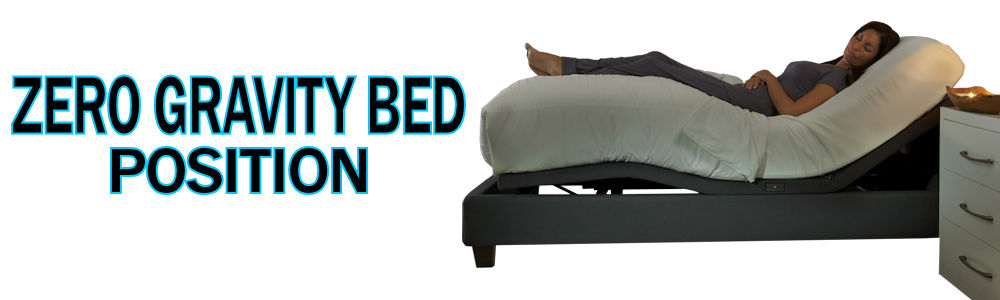
The remote to your adjustable bed will have a separate button dedicated to the zero gravity position. Simply press the button and your base will raise your head and feet, moving into the effective Zero-Gravity position. To release the position, you can either use the flat button or manually adjust to your next desired sleeping position. Some bed models will also have this position accessible via a mobile App. Choosing a bed that comes with this feature makes it more convenient.
Setting a Base When There is no Zero Gravity Preset
So, your adjustable bed base didn’t come with the Zero-Gravity pre-set. Not to worry, you can still manually calibrate your adjustable bed. The Zero-Gravity position is a more neutral position that places the legs above the heart and encourages proper alignment. NASA determined that the body, in its most restful relaxed state, has a 128-degree angle between the thigh and abdomen. So, simply adjust your bed’s head section to move the upper body. Then move the foot section for lower body movement until you reach these results. If your bed has programmable positions, you can save that position so it’s easier to find the next time.